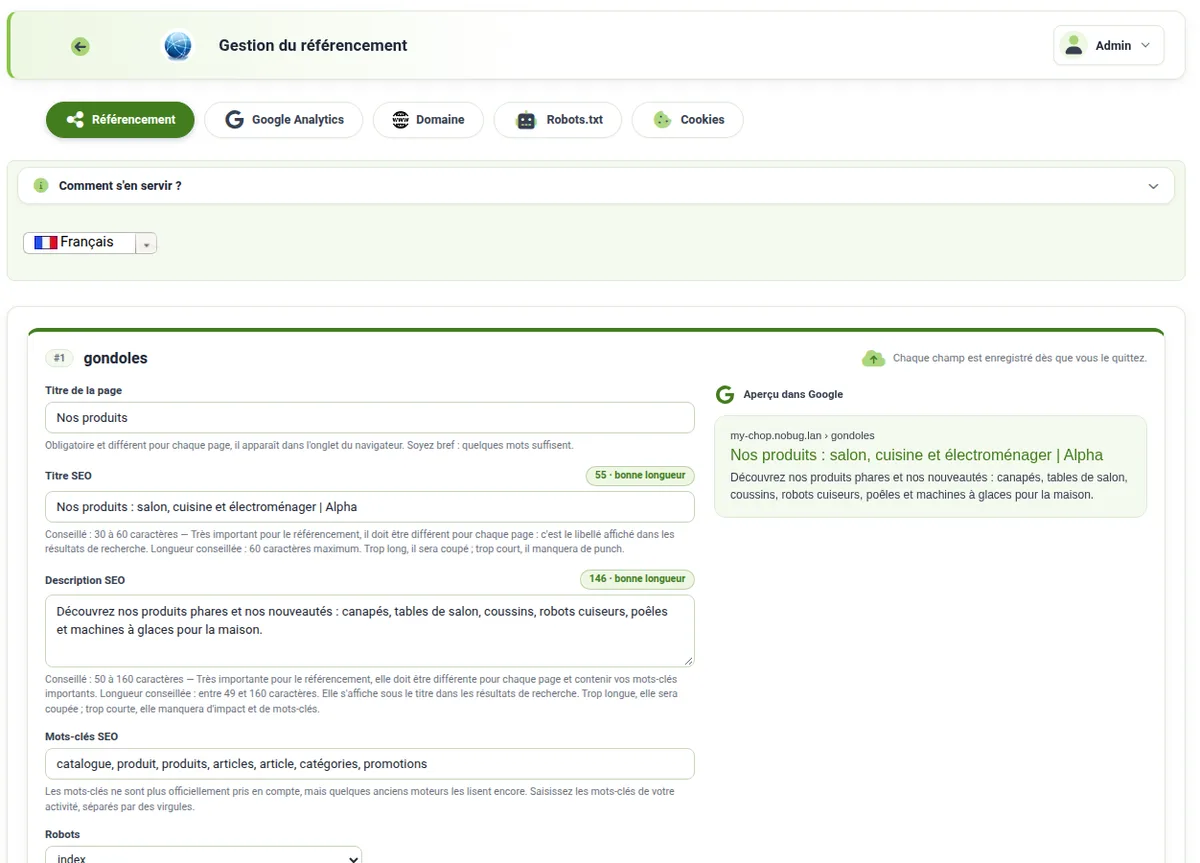
Start by giving each page a carefully written title and description, in the “SEO” menu of your back office, for each language of your shop. Add complete product pages and a little patience: Google is never in a hurry, but it rewards steady work.
Good habits
- The title: about 60 characters, with the words your customers actually type. “Handmade stoneware bowls in Pau” is better than “Home”.
- The description: around 150 characters that make people want to click.
- Complete product pages: a long description written by you, the features, well-named photos. A text copied from the supplier ends up on dozens of sites, and Google knows it.
- Described categories: a few useful sentences at the top of each category.
- Your own domain name, easier to remember and to share.
- Google Search Console: register your shop there to see which searches it appears in.
- Links to your shop: your Google business listing, your social networks, websites about your town or your trade.
What 123Ventes does for you
- The site map (sitemap) is generated automatically.
- The robots.txt file is ready, and you can edit it from the “SEO” menu.
- Your products are described to search engines with structured data: name, price, availability.
- The shop adapts to phones, which Google looks at closely.
Just starting out? Read our beginner’s guide to SEO, then the shop’s SEO tools.
See also: Which SEO tools are built in?, How do I optimise images for SEO?.