Your shop accepts four payment methods: card payment with Stripe, PayPal, bank transfer and cheque. You activate the ones you want in the “Options” menu, “Payment methods” tab.
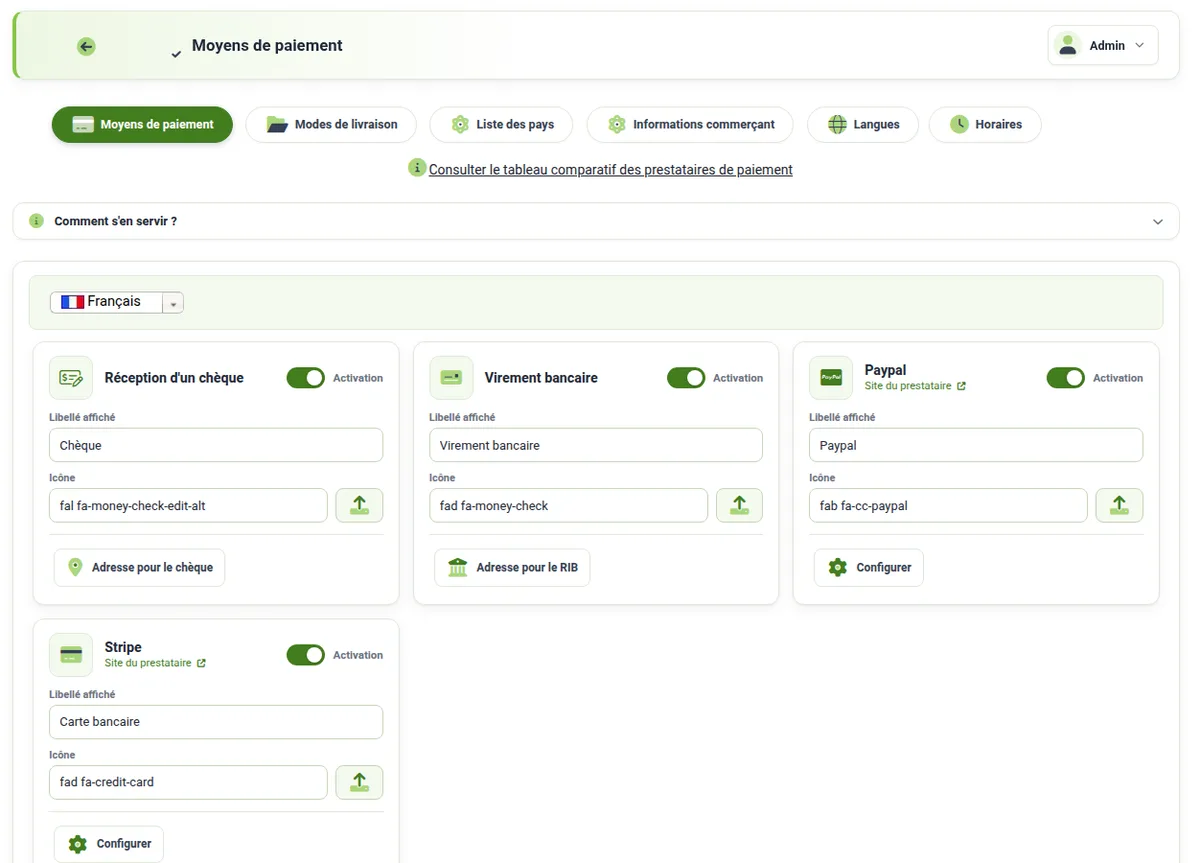
- Card payment with Stripe: the payment is checked automatically and the invoice is created straight away.
- PayPal: works the same way, for customers who prefer their PayPal account.
- Bank transfer: your bank details are taken from your merchant information.
- Cheque: the postal address is taken from your merchant information.
For each method: activate it, change the label and icon if needed, then click “Configure”.
Security
Your customer’s card number is never entered or stored in your shop: it is typed on the secure Stripe or PayPal page. So you have no bank data to protect on your side.
Test before you open
A test mode lets you place fake orders and check that everything works, from the basket to the invoice, before you open. Nobody is charged, not even you.
How much does it cost?
123Ventes takes no commission on your sales: you pay your subscription, and that’s it. Only the payment provider’s fees apply. With Stripe, for a European card, expect about 1.5% + €0.25 per payment, roughly €1 on a €50 order. Bank transfer and cheque cost nothing, but you wait for the money before shipping.
All the details on secure online payment.
See also: How do I accept card payments?, Does 123ventes take a commission on my sales?.