Good news: you don’t need to move your domain name. It stays with your current provider, in your name, and we simply point it to your shop. This is called DNS pointing.
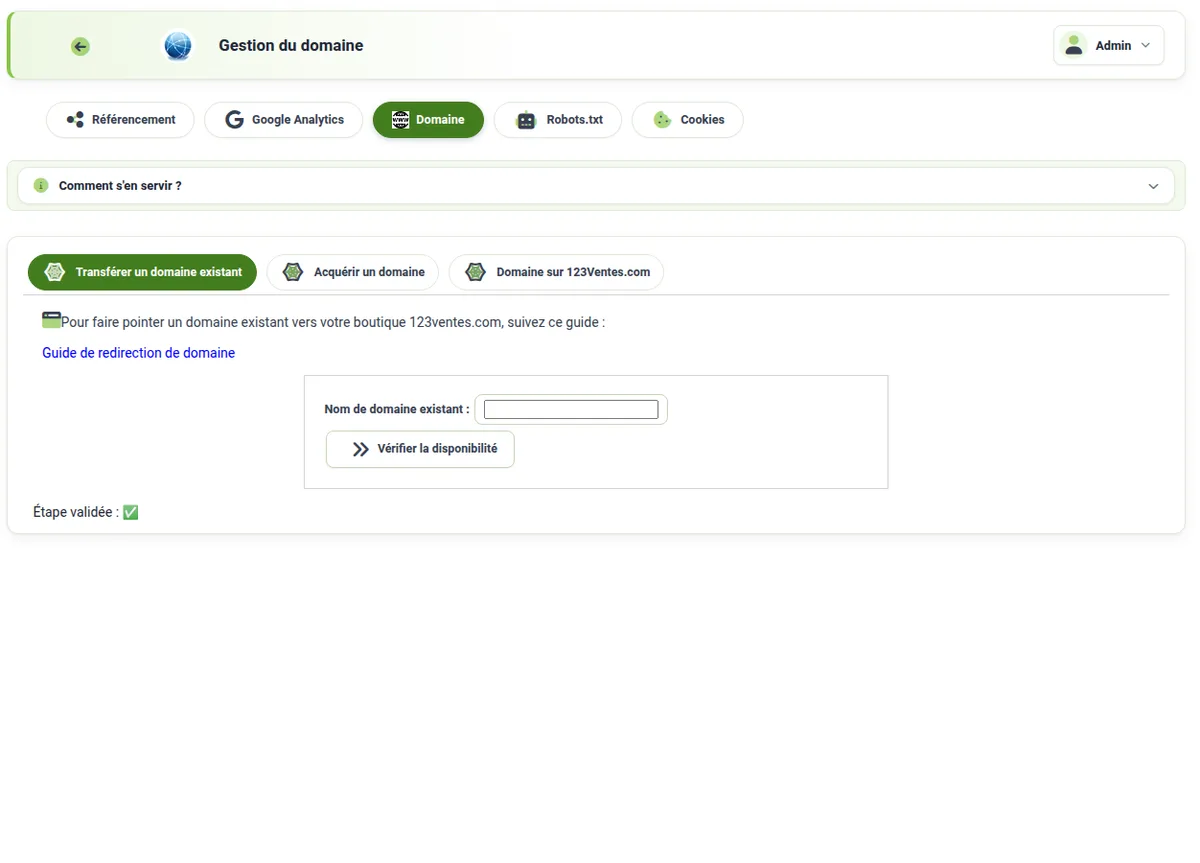
The steps in the back office
- Open the “SEO” menu, “Domain” tab, then “Transfer an existing domain”.
- Enter your domain name in the “Existing domain name” field and click the check button. If the domain does not exist yet, the back office tells you: you can then buy it from the “Buy a domain” tab.
- Click “Order the transfer”. Your request reaches us immediately, and we prepare the pointing with you.
A domain redirection guide, in PDF, is available on the same screen.
What you need at your current provider
To point the domain, its DNS settings must be changed in your customer area, at the provider where you bought it. You have two options:
- you make the change yourself, following the guide and the values we give you;
- you would rather not touch it: we do it together, over the phone or remotely.
Menu names vary from one provider to another, and some like to hide them. If you can’t find them, don’t spend hours looking: we will look with you.
Good to know
- Your domain stays in your name and with your provider: you keep renewing it there, as before.
- During the change, your shop remains accessible at its original address.
- The pointing can take a few hours to be visible everywhere.
A question, a doubt? Contact us or write to support@123ventes.com.
See also: How do I use a custom domain?.